Blog
The Missing Layer Between Your Users and Your Enterprise Data
By Lean Innovation LabsOn every enterprise AI project we take on, whether it's an internal analytics assistant, an agent embedded in a customer-facing product, or a workflow automation tool, we always need to ensure users are getting accurate and reliable answers about the underlying data.
Today's models are more than capable at generating SQL in the abstract, but when you drop them into an actual enterprise environment without any context, you may find that you're not getting the answers you expected. Column names are cryptic. Tables have soft-delete patterns that the model must know about. Guest records have nullable foreign keys. And sometimes the right answer to a query involves a recursive self-join that the model won't produce unless it's explicitly told to look for one.
The SQL query is just a means to an end. What we're really seeking is the right answer.
We built the lightweight nlseek library to help you reliably generate useful and accurate SQL queries, and today we're releasing it as an open source library.
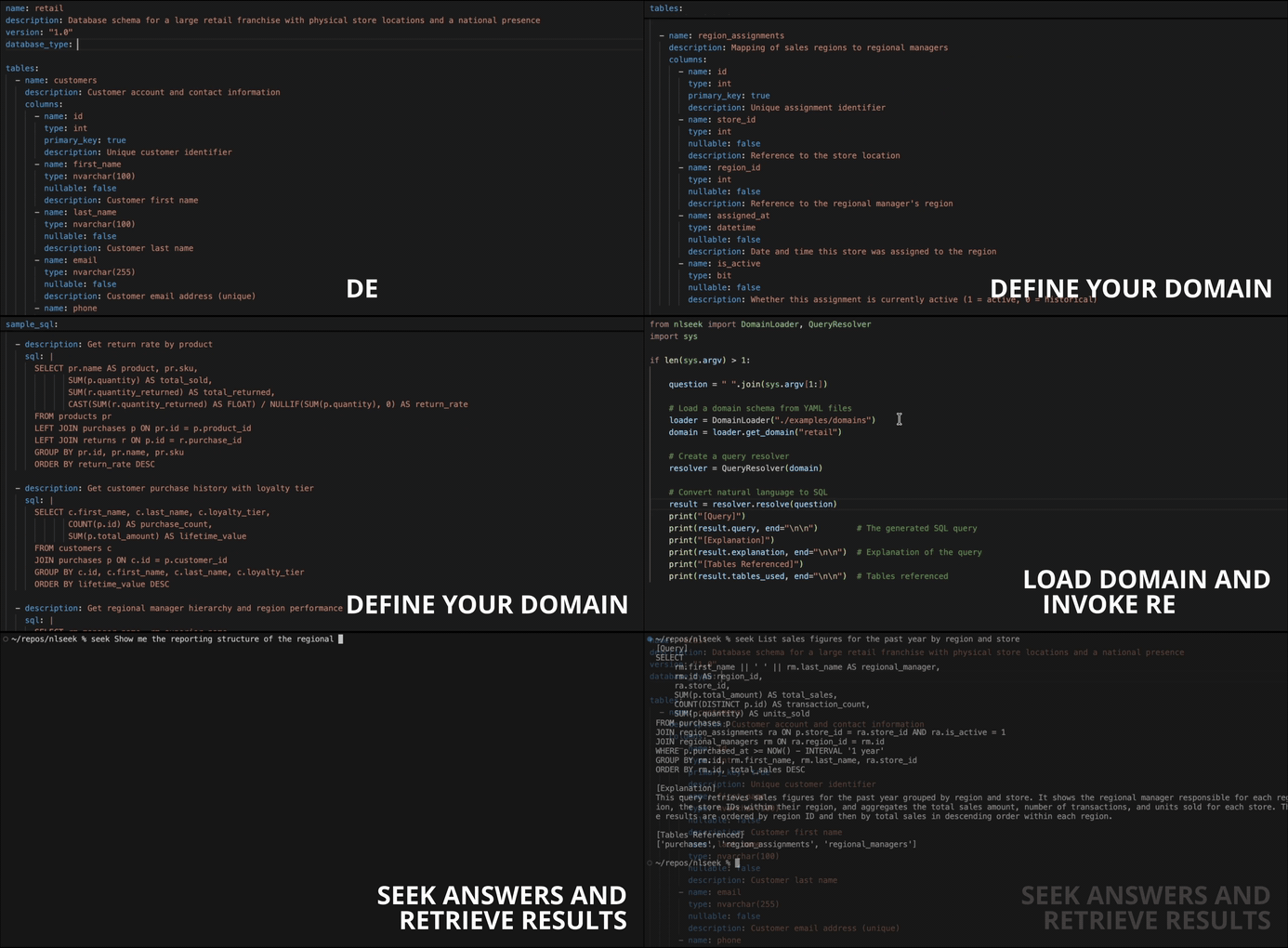
What nlseek offers
nlseek is a Python library that converts natural language questions into accurate, context-aware SQL queries. Instead of shoving your schema into a prompt and praying, you describe your data domain once in a structured YAML file and nlseek uses that definition to produce correct and relevant SQL.
Key capabilities:
- Domain-first design — Define your schema, relationships, business rules, and custom instructions in a declarative YAML file. nlseek uses that structure, not a raw schema dump, to drive query generation.
- Multi-database support — Works with Oracle, PostgreSQL, SQLite. The domain file specifies the database type, and the generated SQL respects the appropriate dialect.
- Relationship awareness — Foreign keys, many-to-one joins, and even recursive self-referencing relationships are understood at generation time.
- Custom instructions — Attach plain-language rules to your domain (e.g., "only use
is_active = 1records unless historical data is requested") and nlseek will follow them. - Multiple ways to register a domain — Load from YAML files, register from a JSON string, or generate automatically from Pydantic or SQLModel model classes.
Where you can use this
- Natural Language Filters for End Users: Replace complex filter UIs with plain-English queries. Instead of dropdowns and date pickers, users type “show me orders from last quarter over $500” and get precise, accurate results without needing to understand the underlying data model.
- AI Data Analyst Agent Tool: Give your agent a reliable, schema-aware query generation tool so it doesn’t hallucinate SQL. Because the domain YAML grounds the generation, your agent produces structurally valid queries against your actual tables — not generic SQL that breaks in production.
- Operational Dashboards for Non-Technical Teams: Finance, operations, and HR teams can pull live data on their own terms — headcount by department, budget vs. actuals, open tickets by priority — without writing a line of SQL or waiting on a data request. They can even build out custom visualizations powered by these queries and create custom dashboards without any help from IT.
- Embedded Reporting in SaaS Products: Let your customers build their own reports inside your platform without exposing raw SQL or building a complex report builder UI. The domain YAML defines their specific data scope, keeping tenants isolated.
- Alerting and Monitoring Rule Configuration: Let users define monitoring conditions in plain English (“alert me when daily signups drop more than 20% week-over-week”) which get compiled into scheduled queries powering alert logic.
Defining a domain
A domain definition is a YAML file that describes your database. Here's a trimmed excerpt from the retail domain — a national retail franchise running on Oracle:
name: retail
description: Database schema for a large retail franchise with physical store locations and a national presence
version: "1.0"
database_type: oracle

tables:
  - name: customers
    description: Customer account and contact information
    columns:
      - name: loyalty_tier
        type: nvarchar(20)
        description: "Loyalty tier: standard, silver, gold, platinum"
      - name: region_id
        type: int
        description: Reference to the region the customer belongs to

  - name: regional_managers
    description: Regional managers responsible for overseeing store locations within a geographic region
    columns:
      - name: id
        type: int
        primary_key: true
      - name: first_name
        type: nvarchar(150)
        nullable: false
      - name: superior_id
        type: int
        description: Reference to the superior regional manager

...

relationships:
  - name: region_assignment_manager
    from_table: region_assignments
    from_column: region_id
    to_table: regional_managers
    to_column: id
    type: many_to_one

...

custom_instructions:
  - "Only use region_assignments records where is_active = 1 unless historical data is requested"
  - "Monetary amounts are always in USD"
  - "Recursively reference the regional_managers table to find the complete reporting hierarchy of regional managers"
  ...
The custom_instructions section is where a lot of the real value lives. This is where you encode business rules, naming conventions, and nuances specific to the database you're working with.
Using nlseek
Once you have a domain file in place, the API is intentionally minimal:
from nlseek import DomainLoader, QueryResolver

# Load a domain schema from YAML files
loader = DomainLoader("./examples/domains")
domain = loader.get_domain("retail")

# Create a query resolver
resolver = QueryResolver(domain)

# Convert natural language to SQL
result = resolver.resolve("Show me the complete reporting hierarchy of regional managers")
print(result.query)        # The generated SQL query
print(result.explanation)  # Explanation of the query
print(result.tables_used)  # Tables referenced
"Show me the complete reporting hierarchy of regional managers" sounds like a simple ask, but steering the model upfront to produce a recursive CTE will drastically increase the chances that it will generate a correct query given what we know about the intended use of the table. Because the retail domain's custom_instructions field tells nlseek to recursively reference the regional_managers table for hierarchy queries, and because the superior_id self-referencing column is declared in the schema, the resolver generates something like this:
WITH RECURSIVE manager_hierarchy AS (
    -- Base case: top-level managers (no superior)
    SELECT
        id,
        first_name || ' ' || last_name AS manager_name,
        superior_id,
        0 AS level,
        first_name || ' ' || last_name AS hierarchy_path
    FROM regional_managers
    WHERE superior_id IS NULL

    UNION ALL

    -- Recursive case: managers with a superior
    SELECT
        rm.id,
        rm.first_name || ' ' || rm.last_name AS manager_name,
        rm.superior_id,
        mh.level + 1 AS level,
        mh.hierarchy_path || ' > ' || rm.first_name || ' ' || rm.last_name AS hierarchy_path
    FROM regional_managers rm
    JOIN manager_hierarchy mh ON rm.superior_id = mh.id
)
SELECT
    id,
    manager_name,
    level AS hierarchy_level,
    hierarchy_path AS reporting_chain
FROM manager_hierarchy
ORDER BY level, manager_name
Without the appropriate context, generating a query that accurately answers this question is unlikely. With nlseek, it's reliable and repeatable.
Other ways to register a domain
If you don't want to maintain YAML files, nlseek offers two additional registration paths.
From a JSON string - useful for dynamic or programmatically-generated schemas:
from nlseek import DomainLoader, QueryResolver

loader = DomainLoader()
loader.register_domain('''
{
    "name": "mydb",
    "database_type": "postgres",
    "tables": [
        {
            "name": "users",
            "columns": [
                {"name": "id", "type": "integer", "primary_key": true},
                {"name": "email", "type": "varchar(255)"}
            ]
        }
    ]
}
''')
domain = loader.get_domain("mydb")
resolver = QueryResolver(domain)
result = resolver.resolve("List all users")
From Pydantic or SQLModel models - ideal if you already have ORM models that describe your schema:
from pydantic import BaseModel, Field
from nlseek import DomainLoader, QueryResolver

class Customer(BaseModel):
    """Customer account information."""
    id: int
    email: str
    loyalty_tier: str | None = None

class Purchase(BaseModel):
    """In-store or online purchase transaction."""
    id: int
    customer_id: int  # Auto-detected as FK to customers.id
    total_amount: float = Field(description="Total amount charged in USD")

loader = DomainLoader()
loader.register_from_models(
    name="retail",
    models=[Customer, Purchase],
    database_type="oracle",
)
domain = loader.get_domain("retail")
resolver = QueryResolver(domain)
result = resolver.resolve("Show top customers by lifetime spend")
The generator handles column name to table name inference, Python-to-SQL type mapping, primary key detection, and foreign key relationship inference automatically.
Why open source
We built nlseek because we needed it for our own projects spanning insurance, manufacturing, logistics, and government. Cleanly packaging domain context for SQL generation isn't the hardest problem to solve, but does provide a boost to our productivity given the pervasive need for it. It's a small idea with a meaningful payoff, and we think others will find it useful.
Get started
nlseek is available now on PyPI:
pip install nlseek
# or, using uv:
uv pip install nlseek
You'll need an Anthropic API key set in your environment:
ANTHROPIC_API_KEY=your-api-key-here
The source and examples are available at github.com/leaninnovationlabs/nlseek.